DNS Record Types Explained

How does a browser know where a website lives?
When you type:
www.google.com
into your browser…
Have you ever thought about:
How does your browser actually find Google’s computer on the internet?
Because computers don’t get names like:
They only understand numbers like:
142.250.190.14
So the big question is:
How do we turn website names into IP addresses?
That’s where DNS comes in.
What is DNS (in super simple terms)?
DNS stands for:
Domain Name System
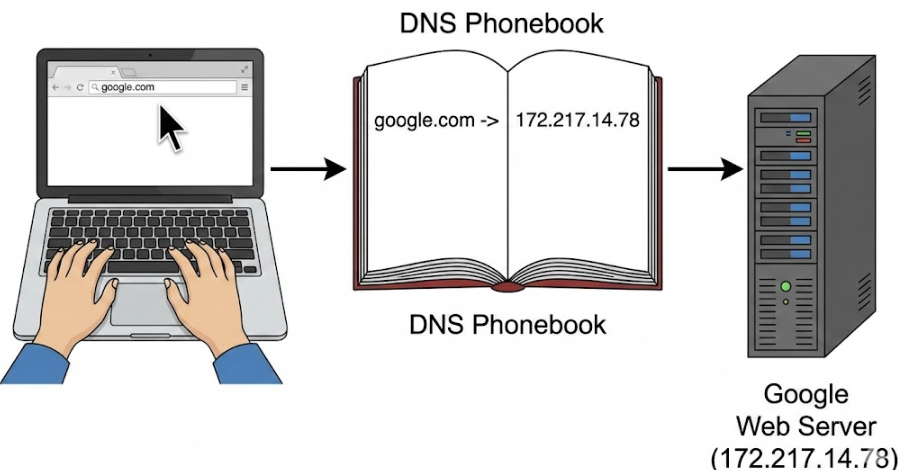
The easiest way to think of it:
DNS is the internet’s phonebook
Just like:
You save a contact as “Mom”
But the phone actually calls a number like +91xxxxxxx
Similarly:
You type google.com
DNS finds the real address (IP) like 142.250.x.x
Why DNS Records are Needed
A domain name by itself isn’t enough.
The internet needs DNS records to figure out things like:
Where is this website hosted?
Who controls this domain?
Where should emails be delivered?
Is this domain verified?
So DNS records are like instructions stored for your domain.
What is an NS Record? (Name Server)
Let's break it down.
Problem it solves:
Who's in charge of this domain?
NS = Name Server
Think of it like:
The post office for your neighborhood
When someone wonders:
“Where can I find example.com’s DNS info?”
NS records give the answer:
ns1.cloudflare.com
ns2.cloudflare.com
Meaning:
Cloudflare is taking care of the DNS for this domain.
Simple DNS hierarchy idea
Internet
↓
NS Record (points to DNS provider)
↓
Other records found there
What is an A Record? (IPv4 Address)
What it does:
Where's this domain hanging out? (IPv4)
An A Record connects:
domain → IPv4 address Example:
example.com → 93.184.216.34
So when your browser asks:
“Where's example.com?”
DNS answers:
Here's the IP address.
Diagram Idea: Domain → Server
example.com ↓ (A Record) 93.184.216.34 ↓ Website Server
What is an AAAA Record? (IPv6 Address)
Just like an A Record...
But for the new internet system.
What it does:
Domain → IPv6 address
IPv6 looks like this:
2001:0db8:85a3::8a2e:0370:7334
So:
A Record → IPv4
AAAA Record → IPv6
Both do the same thing:
Connect domain to server
What is a CNAME Record?
CNAME stands for:
Canonical Name
What it does:
Point one name to another name
Instead of linking straight to an IP...
CNAME links to another domain.
Example:
So:
User types
www.example.comDNS says: “Go check example.com”
Then example.com has the A record.
www.example.com
     ↓ (CNAME)
example.com
     ↓ (A Record)
93.184.216.34
Common Confusion: A vs CNAME
| Record | Points To |
| A | IP Address |
| CNAME | Another Domain Name |
Use A when you know the server IP
Use CNAME when you want a nickname/domain alias
What is an MX Record? (Email Routing)
Now websites are one thing…
But email needs separate routing.
Problem it solves:
Where should emails go?
When someone sends:
DNS uses MX records:
MX → mail.google.com
It tells the internet:
Emails for this domain should go to this mail server.
Diagram Idea: Email delivery
user sends email
     ↓
DNS checks MX record
     ↓
Mail server receives email
Common Confusion: NS vs MX
| Record | Controls |
| NS | DNS provider for domain |
| MX | Email server for domain |
What is a TXT Record?
Think of TXT records as a "notes" section for your domain.
What it helps with:
Extra verification and security details
TXT records are handy for:
Verifying domain ownership
Protecting emails (SPF, DKIM, DMARC)
Verifying with Google Search Console
Example:
TXT: "v=spf1 include:spf.google.com ~all"
What it means:
Only Google servers are allowed to send emails for this domain.
How All DNS Records Work Together (One Website Example)
Imagine you own:
Here’s how your DNS setup might look:
1. NS Record (Who manages DNS)
NS → ns1.cloudflare.com
NS → ns2.cloudflare.com
2. A Record (Main site points to server)
mycoolblog.com → 192.0.2.10
3. CNAME Record (www version)
www.mycoolblog.com → mycoolblog.com
4. MX Record (Email delivery)
MX → mail.google.com
5. TXT Record (Verification and security)
TXT → "v=spf1 include:spf.google.com ~all"
6. AAAA Record (Optional IPv6 support)
mycoolblog.com → 2001:db8::1
Full Flow Diagram (High-Level)
Browser enters: mycoolblog.com
        ↓
DNS checks records
        ↓
A/AAAA gives IP address
        ↓
Browser connects to server
        ↓
Website loads
Final Beginner Summary
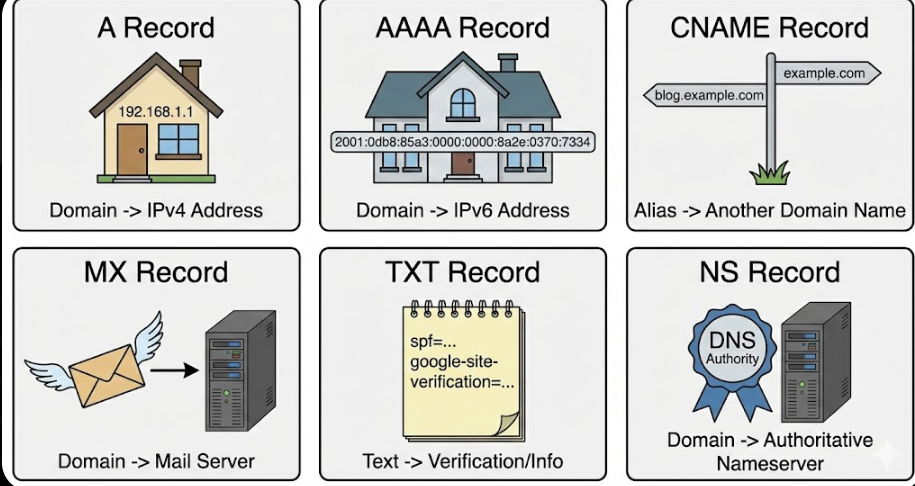
| Record | Purpose |
| NS | Who controls DNS for the domain |
| A | Domain → IPv4 address |
| AAAA | Domain → IPv6 address |
| CNAME | One domain name → another domain name |
| MX | Email routing server |
| TXT | Verification + extra settings |


